

 Resources


 Trending Articles


Storyboarding is where most video film projects stall than short clips. You have the idea, you have the script — but translating that into suitable storyboards, frames, visuals, and sequenced dialogue by hand eats hours you don't have. That's exactly why AI storyboard tools have exploded in popularity, promising to collapse pre-production from days into minutes.
The problem is they all sound the same on paper: script input, AI-generated frames, export options. The real differences only surface when you actually use them — in how the workflow feels, how much creative control you keep, and where each tool quietly draws the line. This is an honest look at five of them — LTX Studio, Boords, Katalist AI, Drawstory, and Novi AI — including one we built ourselves, so you can figure out which one actually fits how you work.
Best AI Storyboard Generators in 2026 (Free & Paid)
Tool 1Novi AI – Easy Script to Storyboard Video Generator
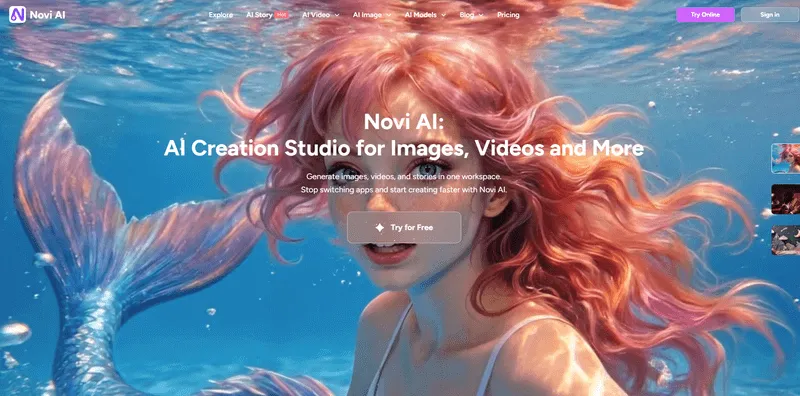
Novi AI is an AI story video platform that takes you from script to finished video — up to five minutes or more — without stopping at the storyboard. You paste a script, one click generate storyboards, shots and animates. Then adds voiceover and subtitles with 50+ AI voices across 60+ languages covering 120+ countries. There are many popular visual style (Ghibli, Pixar, Cinematic, and more) for you to choose. What's more, the platform also runs on top-tier models choices including Seedance 2.0, Google Veo 3.1, Kling 2.5, and Sora 2 — all from one place on web and mobile.
Full disclosure: this is our own product, and we want to be straight about its limits. If you need clean storyboard PDFs with commenting and versioning for client approvals, Boords does that better. Our coin-based pricing takes a moment to learn if you're used to flat-rate plans. And our Video Agent — which will bring the most powerful character consistency and shot-consistency features — is coming soon.
Try It OnlineKey Features
- Free Tier Support: 180 benefit coins (via sign-up + Discord).
- Story-to-Video: From script to automated shot breakdown, then to an animated long-form video with voiceover and subtitles.
- AI Video Generator: 10+ leading models including Seedance 2.0, Veo 3.1, Sora 2, and Kling 2.5 Turbo; supports text-to-video, image-to-video, and video-to-video.
- AI Image Generator: Text-to-image and image-to-image, with Seedream and Nano Banana 2 available.
- 50+ AI Voices: Across 60+ languages, covering 120+ countries.
- Video Agent (Coming Soon): Film-level character consistency, shot consistency, multi-language support, and natural character dialogue.
 Pros
Pros
- One of the most complete script-to-video pipelines available — you don't have to stop at the storyboard.
- Exceptionally broad model selection and voice/language coverage.
- Diverse visual styles go well beyond the traditional aesthetics found in most storyboard tools.
- Works across web and mobile with synchronized credits.
- Genuinely useful for multilingual content creators and global teams.
 Cons
Cons
- Not a dedicated storyboard tool — if clean frame exports and client approval flows are your priority, look elsewhere.
- The coin-based pricing model takes some getting used to.
- Video Agent, the most powerful narrative feature, is not yet live.
- May feel like overkill if all you need is a simple storyboard for internal planning.
| Plan | Price |
|---|---|
| Free | Available with limited models and features |
| 1-Month Plan | $14.99/month |
| Yearly Plan | $89.99/year |
| Lifetime Plan | $119.99 one-time |
| Higher Video-Focused Tiers | Also available with additional credits |
My Review: Novi AI is the right fit if your end goal is a finished video, not just a storyboard. It's best for narrative creators, indie filmmakers, and content teams who want to take a script all the way to an animated, voiced, subtitled video — and who want access to the best current models without juggling multiple subscriptions. If you're a solo creator making multilingual content, it's particularly strong.
Tool 2LTX Studio – AI Filmmaking and Storyboarding Platform

LTX Studio is an AI filmmaking and storyboarding platform built for turning scripts, ideas, and prompts into visual scenes and video sequences. It's aimed at creators, filmmakers, marketers, and production teams who want AI-assisted preproduction in one place. The interface is dark, technical, and unmistakably "AI film studio" — it feels serious in a way that signals this is not a casual tool. Script input is straightforward with direct paste or TXT and PDF file uploads. The model selection is somewhat limited compared to competitors, but "Nano Banana" in particular stands out as a strong performer. However, one significant limitation: storyboard images cannot be directly converted into video. Video generation exists on the platform, but it's treated as a completely separate feature — not a natural continuation of your storyboard workflow.
Key Features
- Visual Preproduction: Strong for scene planning and visual development, not just static boards.
- Script Input: Direct paste or upload TXT and PDF files.
- Image Generation: Reliable model options with solid performance.
- Plan Flexibility: Clear plan ladder from free to enterprise.
- Commercial Scale: Scales well into commercial and team workflows.
Pros
- The interface and workflow actually mirror professional production planning.
- Reliable image generation with solid model options.
- Script-to-visual conversion works smoothly.
- Pricing transparency for agencies .
Cons
- Storyboard images and video generation are siloed — you can't continue from one into the other.
- Credit-based pricing is harder to predict than flat unlimited plans.
- Commercial rights and advanced models are locked behind higher tiers.
- Model selection for storyboard generation is relatively limited.
| Plan | Price |
|---|---|
| Free | 800 credits one time, personal use only |
| Lite | $15/month (or $12/month billed annually) |
| Standard | $35/month (or $28/month billed annually) |
| Pro | $125/month (or $100/month billed annually) |
| Enterprise | Custom pricing |
My Review: LTX Studio is a good fit for filmmakers and content teams who want a polished, professional-feeling tool for preproduction planning. Just go in knowing that if you want to push your storyboard further into actual video, you'll be switching workflows rather than continuing one.
Tool 3Boords – Storyboard Platform for Visual Planning and Collaboration

Boords is a storyboard platform built for planning scenes, organizing shot sequences, and collaborating on visual approvals. It's particularly useful for agencies, production teams, and directors who need a structured, review-friendly storyboard process. The interface is clean, bright, professional, and calm — a noticeable contrast to the dark-themed tools in this space. Script-to-storyboard works with a single click after pasting, and the file format support is genuinely impressive: PDF, TXT, Markdown, HTML, and CSV files up to 2MB are all accepted. The storyboard aesthetics lean traditional — think clean illustration rather than cinematic realism — and animation capabilities are limited to 2D formats. Boords clearly prioritizes the text and workflow layer over the visual image itself, with excellent approval flows, commenting, versioning, and sharing links. However, there's no path from storyboard to video here.
Key Features
- Collaboration Tools: Comments, versioning, guest sharing, and approval flows.
- File Format Support: PDF, TXT, Markdown, HTML, and CSV files up to 2MB.
- AI Writing Assistant: Built-in utility feature for script development.
- Clean Interface: Bright, professional design that's easy to work in.
- Traditional Aesthetics: Clean illustration styles for professional presentations.
Pros
- Excellent collaboration tools: comments, versioning, guest sharing, and approval flows.
- Very broad file format support for script input.
- Clean, calm interface that's easy to work in.
- Well-suited for B2B teams, agencies, and educational or explainer content.
Cons
- Visual style options are limited and lean traditional — not ideal if you need cinematic or stylized aesthetics.
- No storyboard-to-video conversion at all.
- Animation is 2D only.
- The platform feels more oriented toward workflow management than visual output quality.
- AI credits are limited on lower tiers.
| Plan | Price |
|---|---|
| Free | Available with limited storyboards and AI credits |
| Standard | $44/month billed annually |
| Workflow | $89/month billed annually |
| Business | $349/month billed annually |
My Review: Boords is best for teams where the approval and review process is the main event — agencies presenting to clients, production teams managing feedback, or anyone building explainer or educational content who needs clean organization more than visual wow factor. If your storyboard is the final deliverable rather than a step toward video, this is a strong choice.
Tool 4Katalist AI – All-in-One AI Storytelling and Storyboard Platform

Katalist AI is an AI storytelling and storyboard platform that turns scripts or ideas into visual storyboards — and then some. It's aimed at solo creators, indie filmmakers, and studios, but the feature set has grown into something considerably more comprehensive than the name might suggest. The platform uses a dark, tech-forward interface and packs in an impressive density of features: access to top-tier models including Veo 3, Gen-4, Kling, and WAN; lip-sync capabilities; support for up to 10 custom characters; consistent character appearance across scenes; voiceover recording; an AI image editor; and even Adobe Premiere Pro integration. Script input is flexible — paste, upload, or have the AI generate a script from scratch. Katalist does offer video generation, putting it in a different category from most storyboard tools. The honest caveat: the visual style output doesn't always feel current compared to the latest image models.
Key Features
- Model Access: Top-tier models including Veo 3, Gen-4, Kling, and WAN.
- Character Consistency: Support for up to 10 custom characters with consistent appearance across scenes.
- Lip-Sync and Voiceover: Built-in capabilities for character dialogue and narration.
- AI Image Editor: Integrated editing tools for visual refinement.
- Adobe Premiere Pro Integration: Direct workflow connection for professional editors.
- Flexible Script Input: Paste, upload, or AI-generated script options.
Pros
- One of the few tools that bridges storyboard and video in a single workflow.
- Impressive model access including Veo 3, Gen-4, Kling, and WAN.
- Character consistency, lip-sync, and voiceover make it genuinely all-in-one.
- Adobe Premiere Pro integration is a real differentiator for professional editors.
- Flexible script input (paste, upload, or AI-generated).
Cons
- Visual style output doesn't always align with current aesthetic trends.
- Public pricing is inconsistent across sources — harder to evaluate before committing.
- Team and studio pricing is not fully transparent.
- Feature density can feel overwhelming for users who just want a simple storyboard.
| Plan | Price |
|---|---|
| Free | Available with limitations |
| Individual | $39/month |
| Studio/Custom | Custom pricing for teams and professionals |
My Review: Katalist is the tool to look at if you want the most complete storyboard-to-video pipeline in a single platform. It's best for indie filmmakers and studios who want control over characters, models, and output format without jumping between tools. Note: third-party listings show varying team/business tier prices — worth verifying directly on their site.
Tool 5Drawstory – Fast AI Storyboard Generator

Drawstory is an AI storyboard generator built for people who want fast, no-fuss storyboard visuals from a script — no drawing skills required. It targets scriptwriters, directors, and agencies who need a quick visual draft rather than a full production suite. The simplicity here is actually its strength — the interface doesn't try to do too much, resulting in a smooth and fluid experience. Script input supports direct paste or PDF upload. One appreciated feature is the transparency around output: before generating, the platform shows you a clear estimate of how many storyboard images your script will produce and what it will cost. The trade-off is range — storyboard styles available are primarily sketch and comic-book aesthetics, traditional and functional, but limited if you're looking for cinematic or stylized visuals. Like Boords and LTX Studio, there's no path from storyboard to video.
Key Features
- Simple Interface: Smooth, approachable user experience with low learning curve.
- Cost Transparency: Clear estimate of image count and cost before generating.
- Script Input: Direct paste or PDF upload options.
- Traditional Styles: Sketch and comic-book aesthetic options.
- Quick Drafts: Fast storyboard generation without visual design skills required.
Pros
- Very smooth and approachable user experience — low learning curve.
- Transparent cost and image count estimation before generating.
- Good for quick storyboard drafts without visual design skills.
- Accessible price point for individuals and small teams.
Cons
- Style options are limited to sketch and comic-book aesthetics.
- No storyboard-to-video capability.
- Pricing information varies across different published sources, which can be confusing.
- Not suited for users who need cinematic or realistic visual styles.
| Plan | Price |
|---|---|
| Free | 10 images, 1 user, with export and chatbot support |
| Director | Approximately $19–$26/month (varies by source) |
| Pro | Approximately $42/month (some listings) |
| Unlimited | Approximately $109–$126/month (varies by source) |
| Team | Approximately $122/month (some listings) |
My Review: Drawstory is the right pick if you want a lightweight, no-frills storyboard generator and you're comfortable with a traditional visual aesthetic. It's especially practical for directors and agencies that need fast visual references to communicate a script — and appreciate knowing the cost upfront. Pricing published across sources shows some variation, so it's recommended to verify current pricing directly on their site.
6Quick Comparison Table
| Tool | Free Plan | Script to Video | Starting Price | Visual Styles | Best For |
|---|---|---|---|---|---|
| Novi AI | Yes | Yes (Full Pipeline) | $14.99/month | Ghibli, Pixar, Cinematic, 10+ models | End-to-end video production |
| LTX Studio | Yes (800 credits) | No (Separate workflow) | $15/month | Limited models, reliable quality | Professional preproduction planning |
| Boords | Yes (Limited) | No | $44/month | Traditional illustration, 2D only | Team collaboration & approvals |
| Katalist AI | Yes | Yes | $39/month | Veo 3, Gen-4, Kling, WAN models | Indie filmmakers with character consistency needs |
| Drawstory | Yes (10 images) | No | ~$19–$26/month | Sketch & comic-book only | Quick storyboard drafts |
Which AI Storyboard Tool is best for different users?
If your workflow ends at the storyboard — presenting frames to a client, organizing shot sequences before a shoot, or building a visual brief for a production team — Boords and Drawstory are the cleaner fits. Boords is the stronger pick for agencies and teams that need structured approvals, commenting, and versioning built into the process. Drawstory suits individual creators or smaller operations who need fast, readable visual references without a steep learning curve or a large monthly commitment. LTX Studio also belongs in this category if you want the feel of a professional production environment and don't need to push your storyboard into video afterward.
If the storyboard is a step rather than the destination, the calculus changes. Katalist AI gives indie filmmakers and studio teams the most control over characters, lip-sync, and output format — it's purpose-built for people who want a real storyboard-to-video pipeline with access to top-tier models. Novi AI covers the most ground end-to-end, moving from script all the way through to a finished, voiced, and subtitled video — making it the better call if you want the full production handled in one place, particularly for multilingual content. The honest summary: the right tool is almost entirely determined by where your workflow ends.
How to Use Novi AI to Make Storyboard Videos?
Step 1 Start a New Project in AI Story to Video

Open Novi AI's platform and navigate to the "AI Story to Video" feature from the dashboard — click "Start" to create a new project. This is the entry point for the full script-to-video pipeline, so it's worth taking a moment to look at the available options before diving in. You'll land in a clean workspace that walks you through each stage without overwhelming you upfront.
Step 2 Paste Your Script and Generate Your Storyboard
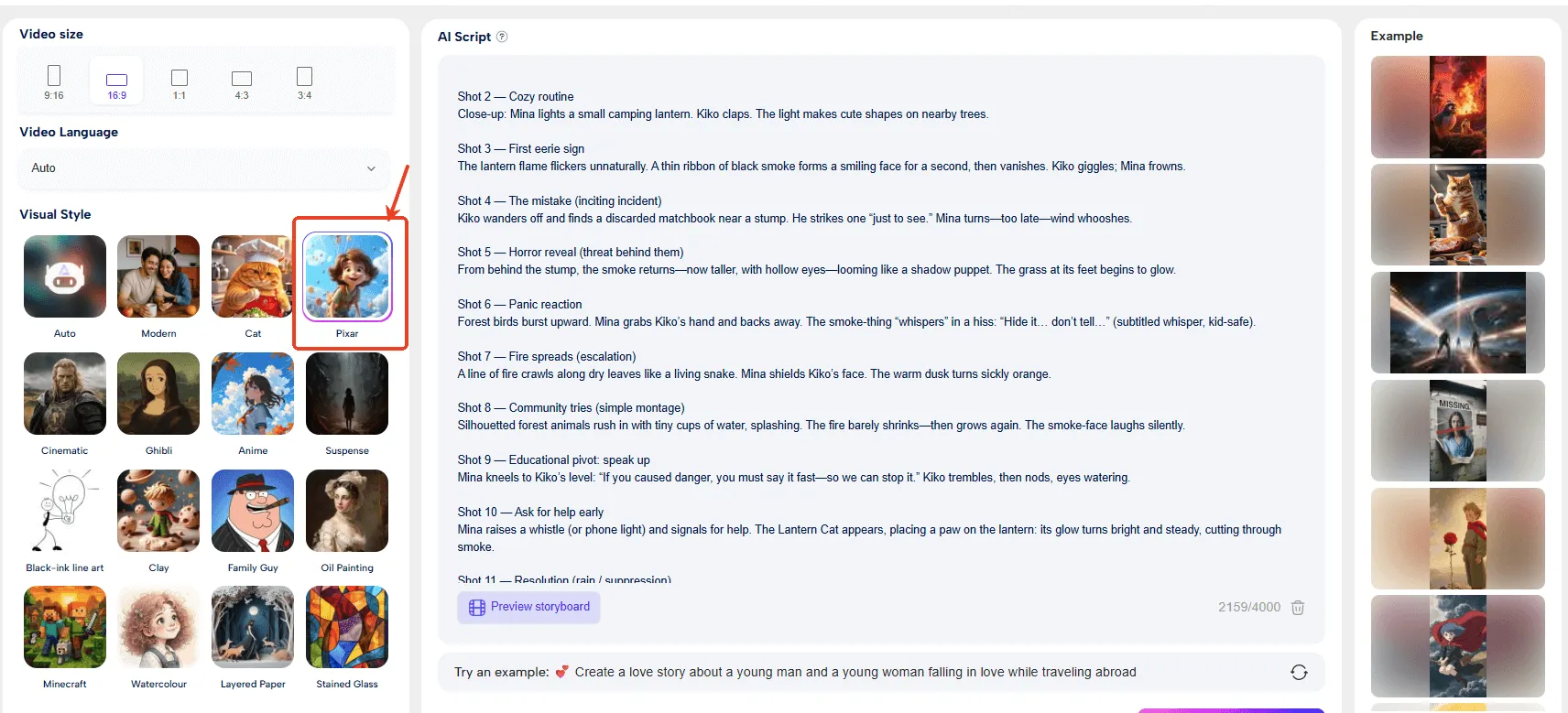
Copy and paste your script directly into the input box. Novi AI will automatically analyze the text, break it into key scenes and shot sequences, and generate a storyboard with frames that match your narrative beats, characters, and scene descriptions. The more structured and descriptive your script, the more accurately the output will reflect what you had in mind — so clear action lines and scene context will get you further than a rough outline.
Step 3 Customize Your Visual Style and Voice

Before generating the final video, you can select a visual style — options range from Ghibli and Pixar aesthetics to Cinematic and beyond — and choose from 50+ AI voices across 60+ languages to handle narration or dialogue. This is also where you pick the underlying AI model powering your video generation, whether that's Seedance 2.0, Kling 2.5, or another from the available lineup. These choices have a real impact on the tone and feel of the final output, so it's worth experimenting if your first pass doesn't quite land.
Step 4 Generate, Preview, and Export
Hit "Generate" and Novi AI will render your full animated video — complete with voiceover, subtitles, and scene transitions — in a matter of minutes. Once the preview is ready, you can review individual scenes, adjust timing or dialogue, swap out frames, or regenerate specific shots before committing to the final export. The result is a complete, shareable video file without ever leaving the platform.
FAQ
1 What's the difference between an AI storyboard tool and a script-to-video tool?
A storyboard tool takes your script and generates sequential visual frames — its job is to help you plan and communicate a video, not produce one. A script-to-video tool goes further, converting those frames into actual animated or rendered video with voiceover and audio. Of the five tools reviewed here, only Novi AI and Katalist AI offer a true script-to-video pipeline.
2 Are the free plans actually usable, or mostly just trial access?
It depends on what you need. Drawstory's free tier gives you 10 images — enough to test the workflow but not enough for a real project. LTX Studio's 800 one-time credits give slightly more runway. Boords' free plan is limited on AI credits. Novi AI's free tier — 180 coins via sign-up and Discord — is on the more generous side for testing core features. None of the free plans are designed for ongoing production use, but most are sufficient to evaluate whether a tool fits before committing to a paid tier.
3 Which tool is best for presenting storyboards to clients?
Boords is the clearest answer here. Its collaboration features — commenting, versioning, guest sharing links, and approval flows — are built specifically for that use case. The clean, professional interface also reads well in client-facing contexts. If your storyboard review process involves external stakeholders who need to leave feedback or sign off on frames, no other tool in this list comes close to matching it.
4 Can any of these tools maintain consistent character appearances across multiple scenes?
Katalist AI is the strongest option currently available for this, supporting up to 10 custom characters with consistent appearance across scenes. Novi AI has character consistency as a core part of its upcoming Video Agent feature, which will extend this further into full narrative production — but that feature is not yet live. The other three tools don't address character consistency in any meaningful way, which is worth knowing if visual coherence across a long-form project is a requirement.
5 Does using AI for storyboarding require any design or filmmaking experience?
Not really, and that's partly the point. Tools like Drawstory and Novi AI are built to work from plain text scripts with minimal setup — you don't need to know how to sketch, frame a shot, or work in production software. That said, the output quality tends to improve when you give the AI more specific, well-structured input. A clearly written script with scene descriptions and dialogue will produce more usable frames than a rough outline. Some filmmaking instinct helps, but none of these tools require it as a prerequisite.
Conclusion
The honest conclusion from comparing these five tools is that there's no single best option — only the right fit for a specific workflow. If client approvals and clean frame organization are the priority, Boords is purpose-built for that. If you need fast visual references without complexity, Drawstory delivers. For serious preproduction in a professional environment, LTX Studio holds up. For a complete storyboard-to-video pipeline with strong character control, Katalist AI is the most capable dedicated option. And if your goal is a finished, voiced, multilingual video without managing multiple subscriptions or tools, Novi AI covers the most ground end-to-end.
Try It OnlineWas this page helpful?

Article by
Aaron Smith