

 Resources


 Trending Articles


![Best AI Animation Tools in 2026: Top 5 Platforms Compared [Free & Paid]](https://images.noviai.ai/noviaien/assets/article/story-tips/best_ai_animation_generator.webp)
AI animation in 2026 isn't about flashy demos anymore—it's production-ready. The big shift? Consistent character faces used to be the "holy grail." Now they're just expected. What creators actually care about today is control: precise camera angles, lighting styles, visual language, and audio that syncs perfectly without post-production.
This guide focuses on tools that solve real problems. We looked at Kling AI's physics for fluid and hair, Runway's director-level camera controls, Seedance's fast social clips and more. Plus, we cover the industry shifts reshaping workflows—like aggregators such as Novi AI and automated production pipelines. Every AI aniamtion tool here matches 2026 priorities, not last year's hype.

Ready to Turn Your Script into Animation?
Try Novi AI's free script-to-storyboard feature today. Create narrative videos with consistent characters and cinematic shots—no animation experience needed.
Why Are AI Animation Tools Getting Popular Than Ever Before?
AI animation tools exploded in popularity because they removed the creative barrier—suddenly, anyone with an idea could animate it without learning to draw or paying professionals. For the first time, ordinary people aren't just cartoon watchers; they're casual creators who can turn random thoughts, inside jokes, or personal memories into animated clips in minutes, no skills required. What used to demand years of training or expensive commissions now just needs a few typed sentences.
This matters because it lets people express their inner worlds visually without facing a camera, spending money, or being held back by "I can't draw." Those personal ideas that used to stay in your head—the funny story about your cat, the birthday surprise for your kid, the meme you wished existed—can now become real, shareable content that feels more alive than photos or text. It's about fulfilling that small dream of "making my own cartoon" just for fun, connecting with others in new ways, and turning precious moments into something warm and lasting without barriers standing in the way.
5 Top AI Animation Tools in 2026
1Novi AI - Best Script-to-Video Animation Generator
Try It OnlineFirst off, I have to mention that Novi AI supports all those top-tier models we touched upon earlier, such as Kling, Runway, and Seedance. It's a one-stop intelligent platform specifically designed for creating narrative-driven videos, which really sets it apart from tools that just generate isolated clips. What makes Novi AI special is its end-to-end approach to animation creation. By aggregating various cutting-edge image and video generation models—such as Seedream and Nano Banana—it allows you to create your characters and scene imagery, which can then be transformed into animated video shorts with consistent visual continuity. The real game-changer here is what I'd argue is the most useful AI animation feature of 2026: a "one-click script-to-storyboard" function. This feature turns your written script into structured scenes complete with consistent characters, camera angles, and sophisticated cinematic language, essentially simplifying the entire storytelling process rather than making you piece together random clips.
 Pros
Pros
- Multi-Model Ecosystem: Offers access to a diverse range of top-tier models—such as Seedance 2.0—allowing users to experiment with the latest technology in real-time and choose the best model for different types of animation shots.
- Versatile Animation Styles: The story video feature supports a wide spectrum of animation aesthetics—ranging from Pixar and Ghibli styles to photorealistic looks—catering to a broad range of creative needs and letting you maintain consistent style across your entire project.
- Multilingual Support: Includes a multilingual feature that allows you to convert a single script into narrative videos in various languages, significantly saving on translation time and making your content accessible to global audiences.
- Free Tier Available: Offers a free plan that allows users to generate a limited number of videos, making it easy to test the platform before committing to a subscription.
 Cons
Cons
- Profession Limitations: The storyboard functionality, while capable and useful for most creators, still falls short when compared to professional-grade, studio-level tools used in major animation productions.
- Paid Access for Advanced Features: Access to more extensive features, longer video outputs, and higher usage limits requires a paid subscription.
Best For: Beginners looking to tell complete stories, individual animation enthusiasts who want narrative control, AI enthusiasts experimenting with the latest models, and small teams creating cohesive animated content without needing separate tools for every step.
2Kling AI 3.0 - Best Physics-Based Animation Tool
Kling AI 3.0 is the undisputed "King of Physics," and once you see it in action, you'll understand why. It excels in the simulation of complex fluids, gravity, fabric movement, and hair dynamics—all without the "melting" artifacts or unnatural motion you often see in other models. What sets Kling apart is its emphasis on physically accurate animation, giving creators fine control over how objects actually behave in motion rather than just looking visually appealing. This results in highly realistic animation sequences that deliver maximum physical fidelity. Compared to other models, Kling is clearly charting a course toward professional-grade specialization, delivering visuals with greater realism and intricate detail that hold up under scrutiny. Given the currently lengthy wait times for Seedance, Kling remains an excellent alternative choice, especially when you need believable physics and cinematic realism more than stylized or narrative-driven automation.
Pros
- Superior Physics Simulation: Excels at rendering complex physical interactions like water, cloth, hair, and gravity with unprecedented accuracy, making animations look genuinely realistic rather than artificially generated.
- Precise Control Over Parameters: Offers fine-grained control over physical properties and motion behavior, allowing creators to dial in exactly how elements should move and interact within a scene.
- Professional-Grade Quality: Delivers highly detailed, photorealistic visuals that are suitable for commercial work and professional productions where visual fidelity is paramount.
- Reliable Alternative: With shorter queue times than some competitors like Seedance, it provides consistent access to high-quality generation when you need it.
Cons
- Higher Cost with Learning Curve: While the tool delivers professional results, it comes at a premium price point, not ideal for those seeking quick, budget-friendly solutions without technical tweaking.
- Less Focused on Narrative Automation: Doesn't offer the same story-building or script-to-video features as platforms like Novi AI, requiring more manual scene planning and assembly.
Best For: Professional animators and VFX artists who need physically accurate motion, creators working on photorealistic commercial projects, and users who prioritize visual realism and detailed control over quick automated outputs.
3Seedance 2.0 - Best Prompt-to-Cinematic Video Generator
If you're an AI video enthusiast, chances are you've already heard of Seedance 2.0—it's been making waves across the community. This tool is built for fast, cinematic animation generation from simple prompts, and honestly, the results can be stunning. With just a simple text prompt—even for a short 15-second clip—you can generate videos featuring a sophisticated array of cinematic shots and visual storytelling techniques that often resemble professionally directed footage. It boasts quad-modal capabilities, audio synchronization, and director-level creative controls, all while translating minimal input into visually rich sequences. The strength of Seedance lies in its ability to produce smooth camera movement, dynamic shot composition, and polished animations quickly, making consistency and fluid cinematography its strong suits. However, it's worth noting that this convenience comes with some trade-offs.
Pros
- Extremely Easy to Get Started: A simple text prompt is all it takes to generate smooth, polished short video clips with sophisticated cinematography, making it accessible even to complete beginners.
- Superior Camera Movement and Composition: Excels at creating dynamic, professional-looking camera work and shot transitions that elevate the cinematic quality of your animations.
- Audio-Visual Synchronization: Automatically syncs audio elements with visual motion, creating cohesive clips that feel complete rather than requiring separate audio editing.
- Fast Generation for Polished Results: Produces visually impressive output quickly, ideal for creators who need high-quality clips without extensive iteration.
Cons
- Potential Copyright and Legal Concerns: Some generated content may raise questions about training data and intellectual property, which could be problematic for commercial use.
- Inconsistent Success Rate: While often impressive, strict content filters that may flag or reject prompts containing copyrighted characters, sometimes requiring multiple adjusts to achieve desired results.
- Long Queue Wait Times: High demand means you may face significant waiting periods before your generation completes, especially during peak usage.
- Increasing Costs: Recent price increases have made extensive use more expensive, potentially limiting accessibility for casual users or those on tight budgets.
Best For: Content creators who need quick, cinematic clips for social media or presentations, AI enthusiasts experimenting with prompt-based video generation, and creators who prioritize visual polish and camera work over narrative structure or precise control.
4Runway Gen-4.5 - Best Director-Level Animation Tool
Runway Gen-4.5 takes a different approach by offering advanced animation control tools aimed at creators who want to truly "direct" their scenes rather than simply prompting and hoping for the best. What makes Runway stand out is its professional-grade cinematic control, featuring specialized tools like "Director Mode" for defining camera movement and "Motion Brush" for painting motion paths directly onto elements within your frame. Rather than automating the entire animation process, it provides granular control over animation elements—letting you define precise camera paths, control object movement trajectories, and emphasize specific motion within a scene. This level of control sets the industry standard for motion refinement, making it ideal for crafting precise, cinematic sequences or refining AI-generated footage for professional use. If you're working on commercial short films or any project where you need exact control over every frame, Runway delivers the director-level precision you're looking for.
Pros
- Director-Level Control Tools: Features like Director Mode and Motion Brush give you precise command over camera movement and object motion, allowing for professional-grade shot composition.
- Industry-Leading Motion Control: Sets the standard for granular control over animation elements, making it possible to achieve exactly the visual effect you envision.
- Professional Workflow Integration: Designed with commercial and professional productions in mind, offering tools that complement rather than replace traditional animation workflows.
- Refinement Capabilities: Excellent for taking AI-generated footage and polishing it to meet professional standards through precise adjustments and controls.
Cons
- Requires More Expertise: The advanced control features have a learning curve and may be overwhelming for beginners who aren't familiar with cinematography concepts.
- Time-Intensive Process: Achieving the best results requires more hands-on work and iteration compared to fully automated tools, which may not suit creators looking for quick outputs.
- Premium Pricing: Professional-grade features come with professional-grade pricing, making it a more significant investment than simpler tools.
Best For: Professional filmmakers and animators who need precise control over every aspect of their shots, commercial content creators working on high-end projects, and experienced users who understand cinematography and want to direct rather than just prompt their animations.
5Magiclight.AI - Best Long-Form Children's Animation Tool
What sets Magiclight apart, in my observation, is its claim to be able to produce video content up to 50 minutes in length—and upon accessing the product interface, I confirmed that it does indeed support this upper limit, though I'll admit the cost is prohibitive enough that I haven't personally tested what a 50-minute video output actually looks like. However, its most distinctive feature is its specialization in simplified animation production for longer-form and child-friendly content. Magiclight automates much of the animation pipeline that would normally require multiple tools: character consistency across scenes, professional voiceovers, synchronized subtitles, and even thumbnail generation for your finished videos. You can even customize elements such as subtitle styling to match your brand or content style. While its animation style is relatively basic and won't match the photorealism of Kling or the cinematic flair of Seedance, it prioritizes ease of use and continuity across extended videos. This makes it particularly effective for storytelling formats like educational cartoons or kids' content where clarity, consistency, and child-appropriate aesthetics matter more than cutting-edge visual effects. That said, its downsides are equally apparent: its scope of application is quite limited, and it's really only suitable for a specific niche.
Pros
- Long-Form Content Support: Capable of generating videos up to 50 minutes in length, making it unique among AI animation tools for creating extended narratives or complete episodes.
- Ideal for Child-Oriented Content: Offers animation styles specifically tailored for children with appropriate visual aesthetics, making it perfect for educational or entertainment content aimed at young audiences.
- Complete Automation Package: Automatically generates subtitles, voiceovers, and video thumbnails, streamlining the entire production process and eliminating the need for separate editing tools.
- Maintains Consistency: Ensures character and scene consistency across long videos, which is crucial for storytelling and viewer engagement in extended content.
- Customization Options: Allows you to customize subtitle styling and other elements to match your brand or content requirements.
Cons
- Basic Animation Quality: The animation style is relatively simple and won't satisfy creators looking for high-end visuals, photorealism, or sophisticated artistic styles—it's really only suitable for children's content.
- Prohibitively Expensive for Long Videos: Generating longer video content consumes a massive number of credits, making extended productions financially impractical for many users.
- No Free Trial Available: Unlike many competitors, there's no free tier to test the platform before committing to a paid plan.
- Limited Scope of Application: The tool is highly specialized for children's content, making it unsuitable for most other animation needs or professional projects targeting broader audiences.
Best For: Educators and content creators producing children's educational videos, parents or small studios creating kids' entertainment content, and creators who need automated long-form animation with consistent characters and don't require high-end visual quality.
6Quick Comparison
| Tool | Best For | Free Tier | Entry Plan | Premium Plan |
|---|---|---|---|---|
| Novi AI | End-to-End Script-to-Animation | 180 Coins for Free Users | $14.99/mo | $29.99/mo (Pro) |
| Kling AI 3.0 | Physically Realistic Animation | 66 credits/day (Free Plan) | $10.00/mo (Standard) | $180.00/mo (Ultra) |
| Seedance 2.0 | Quick Cinematic Animation | 60+ credits/day (via Dreamina) | $18.00/mo (Basic) | $84.00/mo (Advanced) |
| Runway Gen-4.5 | Professional Animation Control | 125 one-time credits (Free Plan) | $15.00/mo (Standard) | $95.00/mo (Unlimited) |
| Magiclight.AI | Kids' Animation Content | Not available / Invite only | Contact Sales | Contact Sales |
How to Create Script-to-Animation Videos with Novi AI
Now that we've covered the top AI animation tools available in 2026, let's walk through the practical process of turning a script into a finished animated video using Novi AI's comprehensive workflow.
Step 1Start a New Project in AI Story to Video

Open Novi AI's platform and navigate to the "AI Story to Video" feature from the dashboard — click "Start" to create a new project. This is the entry point for the full script-to-video pipeline, and unlike tools like Kling or Seedance that focus on individual clip generation, this workspace is specifically designed for cohesive storytelling. You'll land in a clean interface that walks you through each stage without overwhelming you upfront, making it accessible even if you're new to AI animation.
Try It OnlineStep 2Paste Your Script and Generate Your Storyboard
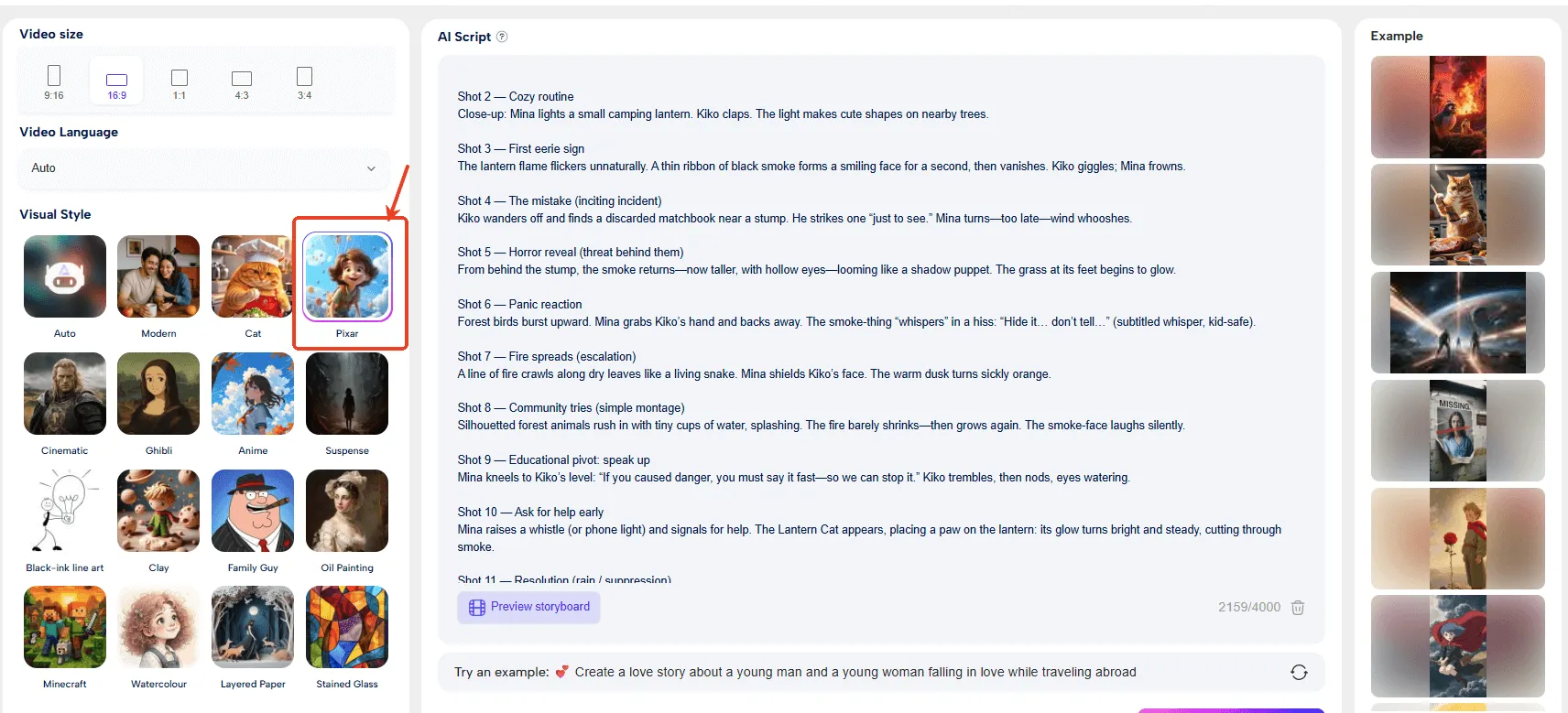
Copy and paste your script directly into the input box. Here's where Novi AI's standout feature comes into play: it will automatically analyze your text, break it into key scenes and shot sequences, and generate a complete storyboard with frames that match your narrative beats, characters, and scene descriptions. This is the "one-click script-to-storyboard" functionality I mentioned earlier — the feature that truly sets Novi AI apart from competitors that require you to manually plan each shot. The more structured and descriptive your script, the more accurately the output will reflect your vision — so clear action lines and scene context will get you further than a rough outline.
Step 3Customize Your Visual Style, Voice, and AI Model

Before generating the final video, you can select a visual style from a wide range of options — everything from Ghibli and Pixar aesthetics to photorealistic cinematic looks — ensuring your animation matches your creative intent. Choose from 50+ AI voices across 60+ languages to handle narration or dialogue, making your content accessible to global audiences..
Step 4Generate, Preview, and Export Your Complete Animation

Hit "Generate" and Novi AI will render your full animated video — complete with voiceover, subtitles, and scene transitions — in a matter of minutes. Once the preview is ready, you can review individual scenes, adjust timing or dialogue, swap out frames, or regenerate specific shots before committing to the final export. Unlike Runway's manual control approach or Seedance's single-prompt generation, this gives you the best of both worlds: automated workflow with the flexibility to refine. The result is a complete, shareable video file without ever leaving the platform — no need to juggle multiple tools or manually stitch together separate clips like you would with most other AI animation solutions.
FAQs
1Which AI animation tool is best for beginners with no animation experience?
Novi AI and Seedance 2.0 are the most beginner-friendly options. Novi AI's script-to-storyboard feature lets you create complete narrative videos from just a written script, while Seedance requires only simple text prompts to generate polished cinematic clips. Both offer intuitive interfaces that don't require technical animation knowledge, and you can use both Seedance 2.0 and the script-to-video feature in Novi AI.
2Can I create professional-quality animations with these AI tools?
Yes, but it depends on your definition of "professional." Kling AI 3.0 and Runway Gen-4.5 offer the highest-quality outputs suitable for commercial work. Kling excels in photorealistic physics simulation, while Runway provides director-level control for precise shot composition. However, for truly studio-grade productions, these tools work best as part of a larger workflow rather than complete replacements for traditional animation pipelines.
3Are there free options available, or do I need to pay for subscriptions?
Novi AI offers a free tier that lets you generate a limited number of videos to test the platform. Most other tools require paid subscriptions for meaningful use. Magiclight.AI notably has no free trial at all. While free tiers are limited, they're usually sufficient to experiment and determine which tool fits your needs before committing financially.
4Which tool is best for creating educational animation content for children?
Magiclight.AI is specifically designed for children's content, offering child-friendly animation styles, automatic voiceovers, subtitles, and the ability to create videos up to 50 minutes long. While its animation quality is basic, it maintains character consistency and automates the entire production pipeline, making it ideal for educational cartoons and kids’ entertainment despite the higher cost for longer videos.
5How long does it typically take to generate an animation with these tools?
Generation time varies significantly by tool and demand. Seedance 2.0 can produce short clips quickly but currently has long queue wait times due to popularity. Kling AI 3.0 generally offers faster access. Runway Gen-4.5 requires more hands-on time since you're directing scenes manually. For narrative projects on Novi AI, expect longer processing due to the multi-step storyboard generation, but the end-to-end automation saves overall production time.
Conclusion
The AI animation landscape in 2026 offers unprecedented opportunities for creators at every level. Each tool brings distinct strengths: Novi AI for script-to-storyboard automation, Kling AI 3.0 for physics-based realism, Seedance 2.0 for instant cinematic results, Runway Gen-4.5 for granular control, and Magiclight.AI for children's content. Success isn't about finding the "best" tool overall, but identifying which aligns with your creative goals, technical expertise, and budget. As these platforms continue to evolve, the barrier between imagination and animated reality grows thinner every day. Animation is no longer just for large studios—it's accessible to anyone with a story to tell.
Try It OnlineWas this page helpful?

Article by
Aaron Smith