Resources


 Trending Articles
Create Epic Martial Arts Battle Videos With Novi AI
Transform your imagination into breathtaking fight scenes with our AI Fight Video Generator. Create cinematic martial arts battles featuring xianxia warriors, samurai duels, wuxia combat, and anime-style action in seconds.

 Click to upload an image
Supported formats: JPG/PNG
Max file size: 10MB
Click to upload an image
Supported formats: JPG/PNG
Max file size: 10MB
120+
Countries Worldwide
2M+
Satisfied Customers
15M+
Active Users
10Y+
Experience in Software
Trusted by Top-Tier Media Wordwide






 Ethan Miller
 Noah Garcia
 Olivia Bennett
 Isabella Parker
 Liam Anderson
 Sophia Carter
 Amelia Brooks
 Chloe Rivera
Ethan Miller
Noah Garcia
Olivia Bennett
Isabella Parker
Liam Anderson
Sophia Carter
Amelia Brooks
Chloe Rivera
Chloe Rivera
Ethan Miller
Noah Garcia
Olivia Bennett
Isabella Parker
Liam Anderson
Sophia Carter
Amelia Brooks
Chloe Rivera
Watch How AI Fight Video Created
Why Xianxia Fight Videos Are Popular?
Xianxia fight videos and stories are popular because they combine visually spectacular, over‑the‑top cultivation battles and magical powers with a clear sense of character growth, where heroes steadily level up like in a game while striving for immortality and transcending human limits, all wrapped in rich Chinese mythology, Daoist and Buddhist philosophy, and romantic or heroic plots that feel culturally deep yet emotionally universal, so both Eastern and Western audiences find them fresh, exciting, and easy to binge across novels, dramas, animations, and games.
What Are the Tips for Creating This Video?
Because this video has two main characters, it helps a lot to prepare clear storyboards or character references for both of them. This gives the AI a better understanding of how each person should look, move, and interact during the fight. Here is an example to create one image with two characters shot:

A few more simple tips that can make the result stronger:
| Feature Point | What to Prepare | Why It Matters |
|---|---|---|
| Character Setup | Prepare clear references or storyboards for both characters. | Let the AI keep each character's appearance, clothing, energy effects, and fighting presence consistent throughout the video. |
| Action Breakdown | Split the scene into short parts, such as face-off, attack exchange, and final clash. | Breaking the sequence into stages makes complex battle scenes easier to control and improves the flow of the final result. |
| Visual Effects | Clearly describe effects like blue flame qi, purple energy strikes, shockwaves, smoke, and debris. | Specific VFX instructions help the AI create stronger impact and make the fight feel more cinematic. |
| Environment Design | Include details about the ruined arena, cracked ground, broken structures, and lingering smoke. | A strong environment adds scale, atmosphere, and makes the battle feel more immersive. |
| Camera Language | Mention rotating angles, side views, aerial shots, and close-up impact frames. | Camera direction helps shape the pacing and gives the video a more dynamic, film-like look. |
| Style Consistency | Keep the tone aligned with dark fantasy, epic action, and cinematic realism. | Consistent style helps all parts of the video feel connected and avoids a mixed or uneven result. |
| Creator Credit | Include a simple note crediting the partner creator. | This gives proper recognition while also guiding viewers to explore more creative inspiration. |
This video was created by our partner creator, Andreas Hutapea. If you'd like to explore more ideas and connect with other creators, feel free to visit our social channels, you can find it in the lower left corner.
More Use Cases for AI Fight Video Generator
Epic Xianxia Fight Scenes
Create breathtaking martial arts battles with swordsmen, mystical powers, and aerial combat. Perfect for fantasy storytelling, cinematic-style content, and bringing legendary wuxia action to life with authentic Chinese mythology aesthetics.
Classic Wuxia Combat Choreography
Generate traditional martial arts duels with graceful action techniques, kung fu robes, ancient Chinese landscapes or cyberpunk background. Ideal for period dramas, historical action sequences, and capturing the timeless essence of kung fu cinema.
Intense Samurai Battle Sequences
Craft powerful katana duels with honorable warriors, traditional Japanese armor, and feudal-era battlefields. Perfect for historical recreations, samurai-themed content, and showcasing the discipline and artistry of bushido combat.
Dynamic Anime Fight Animation
Produce high-energy anime-style battles with explosive effects, speed lines, and exaggerated movements. Great for manga adaptations, gaming content, fan animations, and creating jaw-dropping action sequences with vibrant colors and bold strikes.
How to Use the AI Fight Video Generator
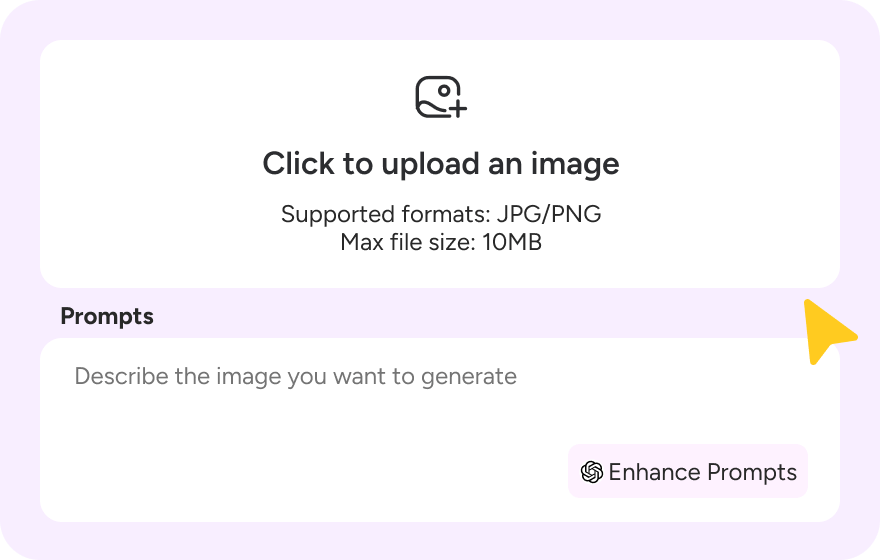
Step 1: Describe Your Fight Scene
Enter a detailed prompt describing your AI fight video scene, such as "samurai duel at sunset," "xianxia warriors with flying swords," or "anime battle with energy blasts." Include characters, fighting styles, and atmosphere for best results.
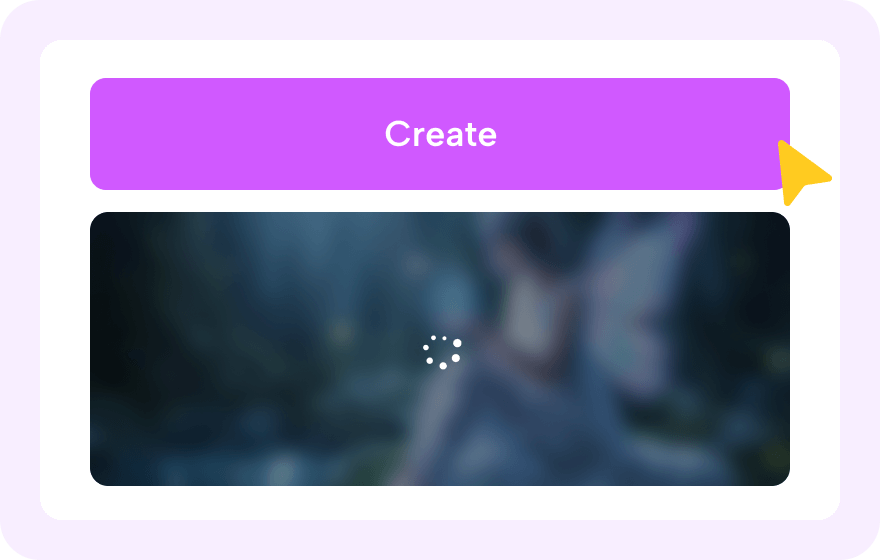
Step 2: Generate the AI Fight Video
Click "Create" to generate your AI fight video. Our advanced AI will transform your combat description into a dynamic martial arts battle scene with realistic movements, choreography, and cinematic effects in seconds.
Step 3: Download and Share
Preview your generated AI fight video with epic combat sequences and download it instantly in high quality, or share it directly to social media platforms tagged with #MadeWithNoviAI.
Why Choose Our AI Fight Video Generator


FAQs About the AI Fight Video Generator
1. Which AI video model works best with fast-paced action sequences?
For fast-paced action and fight choreography, you'll want to look at Seedance 2.0 and newer cinematic models like Sora 2 or Kling 3.0, which handle motion blur, camera shake, and quick cuts more gracefully than most general-purpose generators. These tools really shine when you give them tight, motion-specific prompts and stable reference images, helping keep limbs and strikes readable even during intense sequences.
Seedance 2.0 in particular gets praise from creators for action-oriented clips, especially when you lock in character designs and use its built-in motion and camera-control prompts designed specifically for combat and chase scenes.
2. Where can I get good prompts for anime fight AI videos?
The best places to find anime fight prompts are specialized prompt libraries and tutorials focused on AI video generation. Resources like Seedance's "Action, Combat & Chase" prompt packs or ReelMind's anime fight generator guides offer detailed templates covering choreography, camera angles, and visual effects.
I'd also recommend browsing shared videos on platforms like Twitter, Threads, and Reddit, where creators frequently post their prompts alongside their work. Joining Discord communities focused on AI video generation can be valuable too—you can discuss techniques and see examples from other artists in real-time. For example, hashtags like #noviai is another good way to discover our cooperated creators' inspiration.
3. How can I make a seamless multi-character AI fight using Seedance 2 and image tips?
To create a seamless multi-character fight in Seedance 2, start by generating very clear, consistent character reference images showing front, side, and key poses, then lock them into the tool's image-to-video or character-ID system before animating short attack-reaction beats in separate clips that you'll stitch together in an editor for continuity. Use detailed prompts that tightly describe each turn of action—like "Character A dashes forward and delivers an uppercut; Character B blocks and counters with a spinning kick"—while keeping camera motion simple with fixed angles or gentle tracking so the AI doesn't get confused trying to juggle multiple movements at once.
4. How can I get better at creating AI fight scenes?
Getting better at AI fight scenes really comes down to adopting a shot-by-shot workflow: plan your choreography on paper or in rough sketches first, then generate each individual beat—intro stance, dash, impact, recoil—as a short clip with detailed motion and camera prompts, iterating until the timing and posing feel natural. It helps to regularly study existing anime choreography and translate what you see into prompts using terms like "fluid motion," "fast-paced dash," "impact shockwave," and "camera shake on hit," while also experimenting across different models like Sora 2 for fluidity or Seedance 2.0 for cinematic blur to find which one handles your chosen style with the least motion breakdown.
Discover More AI Video Tools

More AI Video Styles and Generators
Take Your Creativity Further with Our Other AI Video Generators
AI Video Generator
Create videos from a photo or a prompt. Add smooth motion, camera moves, and cinematic effects for social clips, product shots, and story scenes.